


2001 FECA Bulletins which have previously been issued by the DFEC but have since expired or been superseded by another Bulletin, Circular or inclusion in the FECA Procedure Manual.
|
Bulletin |
Subject |
|---|---|
|
Bill Payment/BPS - "Real-Time" Pharmacy (12/00A) |
|
|
Bill Payment/BPS - Modifications to Inpatient Hospital Bill Procedures (12/00A) |
|
|
Bill Payment/BPS - Prior Authorization for Pharmacy (01/01A) |
|
|
Periodic Roll Management: Evidence of Earnings (01/01A) |
|
|
Impairment/Schedule Awards: Fifth Edition of the AMA Guides to the Evaluation of Permanent Impairment (02/01A) |
|
|
Compensation Pay: Compensation Rate Changes Effective January 2001 (02/01A) |
|
|
BPS - Revision in the Reimbursement Rates Payable for the Use of Privately Owned Automobiles Necessary to Secure Medical Examination and Treatment. (02/01A) |
|
|
Comp Pay - Extra Pay for Firefighters |
|
|
COP Nurse Intervention (02/01B) |
|
|
Medical- - Use of Physicians Directory System (PDS) |
Attention: This bulletin has been superseded and is inactive.
FECA BULLETIN NO. 01-01
Issue Date: October 25, 2000
Expiration Date: October 24, 2001
Subject: Bill Payment/BPS - "Real-Time" Pharmacy
Background: Since the summer of 1998, DFEC has been receiving and processing bills received via electronic data interchange (EDI). Since that time, the proportion of direct pharmacy billing has increased, and approximately 50 percent of all pharmacy bills are now received via EDI.
A new service is being offered to pharmacies effective October 23, 2000. "Real-time" pharmacy bill processing will allow pharmacies, through a clearinghouse intermediary, to enter information concerning a pharmacy bill on their point of sale device and receive a rapid response from OWCP as to whether the bill is payable, and the amount payable. If the bill is payable, the claim will be captured and processed by OWCP.
Reference: FECA Bulletin 98-11.
Purpose: To notify District Offices of an enhancement to the bill processing system.
Applicability: All staff.
Actions:
1. DFEC will receive and process "real-time" electronic bills from pharmacies for prescription drugs, through intermediary clearinghouses. Through a secure communications link, pharmacies will be able to submit bills to a central location in the National Office. The bills will undergo editing that essentially mirrors the editing performed by the bill edit program (BILL552), and the pharmacy will receive an immediate (on-line) response as to the payability of the bill.
2. If the bill is determined to be payable, the amount payable under the fee schedule will be calculated, and the pharmacy (through the clearinghouse) will receive a message that the bill is approved, and the amount payable.
3. If the bill is not payable, the pharmacy (through the clearinghouse) will receive a message that the bill is not payable, and the reason. After that, the pharmacy may submit the bill to OWCP through the regular EDI process, or submit the bill in paper form for routine processing by the district office.
4. The payable bills will be transmitted to the appropriate district office for processing. "Real-time" bills will be loaded automatically via BILL516.
5. A batch number assignment scheme similar to that devised for EDI pharmacy bills has been developed for "real-time" pharmacy bills, as follows:
The first three characters will be EDR
The fourth character is a letter from A to L, which
represents month 01-12.
The fifth character is a letter from A to Z, or number
between 1 and 5, which represents the day of the month.
The sixth character is a letter between A and Z which
represents the number of batches between 01 and 26.
6. The "real-time" bills will be loaded with a bill total equal to the sum of the payable amounts for each line item. The line item amount will be the actual amount billed by the pharmacy. If the payable amount for the line (due to the application of the fee schedule) is less than the billed amount, an ineligible amount equal to the difference between the two will be loaded, with an ineligible amount code of I. If the payable amount equals or exceeds the billed amount, these two fields will be blank.
7. All "real-time" bills will be loaded with an appeal code of B, so that the fee schedule is bypassed. Reapplication of the fee schedule is not needed, since it will have been applied already during National Office processing.
8. Once the EDR bills are loaded into the bill tables on the Sequent, they will be edited by a modified version of the bill edit program, which applies only duplicate (edits 801-805) and restricted/excluded provider (edits 201, 202) edits. No new edits are required for "real-time" bills.
9. BILL552 reports will be produced for the EDR batches (along with other bills). The number of suspended "real-time" bills should be minimal. Any bills that do suspend will require resolution, in accordance with existing procedures.
10. As with the EDI pharmacy bills, because the "real-time" bills are submitted electronically, ability to change the data in bill resolution is very limited. The only data field which may be accessed in bill resolution is the bypass code.
11. As with EDI pharmacy bills, the addresses for "real-time" pharmacy bills are obtained from a central location, rather than the district office provider file. The address sequence number will be FD, and claimant reimbursements will not be allowed.
Disposition: Retain until incorporated in the Federal (FECA) Procedure Manual.
DEBORAH B. SANFORD
Acting Director for
Federal Employees' Compensation
Distribution: List No. 3--Folioviews Groups A, B, C, and D
(All FECA Employees)
Back to Top of FECA Bulletin No. 01-01
Attention: This bulletin has been superseded and is inactive.
FECA BULLETIN NO. 01-02
Issue Date: November 15, 2000
Expiration Date: November 14, 2001
Subject: Bill Payment/BPS - Modifications to Inpatient Hospital Bill Procedures
Background: A fee schedule for inpatient hospital bills, based on the Medicare system of Diagnosis-Related Groups (DRGs), was implemented January 4, 1999. Since then, inpatient hospital bills have been data entered using special software on a stand-alone computer. Bills processed as inpatient bills have been limited to those containing certain codes in the Locator-4 position on the UB-92 billing form.
Through processing inpatient hospital bills, we have found that there are various categories of inpatient bills that could not be processed accurately through the existing mechanism and/or required extensive manual handling by District Office staff. These categories include interim bills, bills from intermediate care units within hospitals (skilled nursing facilities), and short stay (1 day) bills.
In addition, because of the unique characteristics of bills processed under FECA, and the relatively small number of such bills when compared to the Medicare system, adjustments are being made to the payment calculation algorithms. The maximum amount payable for any inpatient bill will be limited to no more than 120% of the billed amount. Allowable charges for stays of less than 24 hours will be calculated based on the applicable cost-to-charge ratio for the state in which the hospitalization took place.
Allowable fees for the new categories of bills (interim and skilled nursing facility bills) will also be processed using a cost-to-charge ratio.
The above changes will be applicable to all inpatient bills regardless of dates of service. However, it should be noted that the pricing factors are updated annually by the Health Care Financing Administration (HCFA) effective October 1 of each year. The date of discharge is used to determine which year's pricing factors are applied to a particular bill, and only five year's worth of pricing data is maintained.
Reference: FECA Bulletins 99-21 and 99-31; Federal (FECA) Procedure Manual, Chapter 5-203, Exhibit 1.
Purpose: To notify District Offices of revised procedures for processing inpatient hospital bills.
Applicability: All staff.
Actions:
1. Effective November 15, 2000, the parameters for separating inpatient from outpatient bills are as follows:
a. The first digit of the code in form locator 4 must be 1, 2, 4, 6, or 8; the second digit 1, 2, 5, 6, 7 or 8; and the third digit 1, 2, 3, 4 or 7; and
b. Room and board charges are present on the bill. Such charges are shown with RCCs of 100 through 169.
2. Hospital bills meeting the above guidelines will be forwarded to the National Office in accordance with FECA Bulletin 99-31 for data entry.
3. The FECS001 "Bill Input" program has been modified to block data entry of the additional inpatient hospital locator 4 codes, as described above.
4. If a hospital appeals fee reductions on interim bills, the allowable fee for the entire hospitalization may be recalculated once the patient is discharged, and the admit through discharge bill is provided. The total sum of the previously paid amounts should be shown as a prior paid amount in Locator-54 on the UB-92 form.
Training on these procedures should be completed as soon as possible.
Disposition: Retain until incorporated in the Federal (FECA) Procedure Manual.
DEBORAH B. SANFORD
Acting Director for
Federal Employees' Compensation
Distribution: List No. 3--Folioviews Groups A, B, C, and D
(All FECA Employees)
Back to Top of FECA Bulletin No. 01-02
Attention: This bulletin has been superseded and is inactive.
FECA BULLETIN NO. 01-03
Issue Date: December 26, 2000
Expiration Date: December 25, 2001
Subject: Bill Payment/BPS – Prior Authorization for Pharmacy
Background: Currently DFEC receives and processes pharmacy bills via electronic data interchange (EDI) and in paper form for routine processing by the district office. Recently, "Real-Time" processing was implemented (see FECA bulletin 01-01) as a service to pharmacies that allows them to know immediately if a medication is payable. This service will result in an increase in EDI bills since many pharmacies would not use the previous batch process without assurance of payment. Because "Real-Time" pharmacy bills are edited at a central location, bills that formerly would have suspended at the district office are now rejected in the "Real-Time" process. In order to allow offices to record their decisions on these bills, so that a greater proportion of pharmacy bills in both the "Real-Time" and other processes may be processed without suspension or rejection, a prior authorization function for pharmacy has been developed. The new desktop application will allow Claims Examiners to authorize or deny a particular drug. An authorization takes precedence over therapeutic class to ICD-9 relationship editing. A pharmacy bill that currently suspends with error 738 requires manual review; prior authorization will prevent bill suspensions.
New edits have been developed to assist with the processing of pharmacy bills where a prior authorization exists. A new table has been created to capture pharmacy prior authorization decisions. The new prior authorization function will be available for use on or after December 26.
Reference: FECA Bulletins 01–01, 99–04, and 98–11.
Purpose: To notify District Offices of the new prior authorization process for prescription drugs.
Applicability: All staff.
Actions:
1. DFEC will continue to receive and process "Real-Time" bills from pharmacies for prescription drugs through intermediary clearinghouses.
2. If a "Real-Time" bill is submitted and the therapeutic class to ICD-9 relationship editing results in a suspend decision, and no authorization is found for the therapeutic class on the new table, normal relationship editing will occur resulting in a rejection. The pharmacy will receive the message, "Needs manual review". In cases where the general suspense flag is set to "Y" the pharmacy will receive the message, "All bills require manual review." When either of the previous situations occur, the pharmacy may contact the district office for authorization. The CE must enter a decision to either pay or deny the medication. The authorization will take effect immediately at the central site. Once the decision is entered, the pharmacy can resubmit the bill right away.
3. The prior authorization function may also be used for pharmacy bills submitted through the EDI batch process or on paper. The authorization function will most commonly be used when a bill suspends with edit 738, if an EOB return is received for edit 734, or as the result of a telephone request for authorization.
4. To authorize payment for a medical condition, the CE will first double-click on the desktop application icon, and enter the Sequent user ID and password. The CE will then enter the case and NDC numbers into the authorization screen and select "Submit Query" (see Attachment 1). The results of the query are a complete list of existing authorizations, therapeutic class, action, add date, change date, and begin and end dates. From this screen, the CE may also view case notes, accepted conditions, NDC information, therapeutic class description and therapeutic class to IDC-9 relationships ( see Attachments 2a, see Attachments2b-c , see Attachment 3). Other pertinent information provided is the case type, status, and date of injury.
5. The CE should review the accepted condition list, which also includes modifiers, e.g., aggravation, right, left, or both. In addition, the therapeutic class descriptions and ICD-9 relationships should also be reviewed. Note that if the case contains ICD-9 accepted conditions, only the therapeutic class to ICD-9 relationships for those conditions are displayed. If the case record contains no ICD-9 accepted conditions, then all of the therapeutic class to ICD-9 relationships for that therapeutic class are shown. If necessary, the CE may consult the case file record or reference materials (such as the Physicians' Desk Reference), or seek medical guidance.
6. If the CE decides to authorize a specific medication, click the "Add/Modify" icon located in the upper right corner of the authorization screen. A message, "Add a record for this Therapeutic Class?" will appear if no record for that class exists (see Attachment 4). If the user clicks on "Yes," then the add authorization screen will appear. The user must enter a decision (pay or deny) and enter the authorization period. The system decision defaults to pay, and the period defaults to today's date as the begin date, and one year from today's date as the end date. The default period of one year is considered a generous window that allows for the payment of drugs used in most cases. The user may authorize a shorter period whenever there is evidence that the medication will be used for only a limited time (i.e. antibiotics for a wound infection, muscle relaxants for a muscle sprain, etc.). Although the user can also authorize medications for periods longer than one year, this function should be used sparingly. Medications with high potential for addiction and abuse should not be approved for periods longer than one year, particularly, all opiate agonists, opiate partial agonists, and barbiturates. Once an authorization is entered, bills for medications in the same therapeutic class will pass the relationship edits until the date expires. After the CE enters a decision and authorization period, select "Save" to exit the add option.
7. The CE may also modify any existing authorizations. The CE should enter the case number, existing NDC code and click the "Add/Modify" icon located in the upper right corner of the authorization screen (see Attachment 5). The system default for the modify option is what is currently defined in the record. After selecting the record for modification, the modify authorization screen will appear. The CE can modify the record to "deny" if it was originally set to "pay" and vice versa, and modify the "begin" or "end" dates. After the CE modifies the record, select "Save" to exit the modify option. If no changes are made to the record, the change date field does not change.
8. The user may enter another authorization by selecting "New Query" or may "exit" the program through the file option located on the menu bar.
9. Two new Bill 552 edits (Attachments 6 and Attachments 7) have been developed for pharmacy prior authorization. Edit 335 is assigned when a therapeutic class has been denied for the date of service. Edit 336 is assigned when there is a matching authorization record (either pay or deny) for the therapeutic class, but the service dates are outside of the authorization dates.
10. An updated condensed edit list and EOB listing will be provided under separate cover.
11. Training on this Bulletin should take place as soon as possible. Offices must also be prepared to respond to telephone requests for authorization of prescription drugs.
Disposition: Retain until incorporated in the Federal (FECA) Procedure Manual.
DEBORAH B. SANFORD
Director for
Federal Employees' Compensation
Distribution: List No. 3–Folioviews Groups A, B, C, and D
(All FECA Employees)
Attachment 6 - Bill Edit 335L (Pharmacy Authorization)
|
December 1, 2000 |
|
|
|
MEDICAL BILL SYSTEM |
|
|
|
|
EDIT NO. 335L |
|
|
ERROR DESCRIPTION: |
THERAPEUTIC CLASS DENIED |
|
EDIT DESCRIPTION: |
PHARMACY AUTHORIZATION TABLE CONTAINS DENIAL FOR THE |
|
SUSPEND/DENY: |
D |
|
OVERRIDE: |
N |
|
EOB: |
Payment for this medication is denied. |
|
PRIORITY: |
2 |
|
BILL RESOLUTION: |
|
|
This edit fails when a pharmacy authorization record has been established to deny any drug in the therapeutic class. To pay for the drug, the matching authorization record must be changed or deleted |
|
Back to Top of FECA Bulletin No. 01-03
Attachment 7 - Bill 336L (Pharmacy Authorization)
|
December 1, 2000 |
|
|
|
MEDICAL BILL SYSTEM |
|
|
|
|
EDIT NO. 336L |
|
|
ERROR DESCRIPTION: |
SERVICE DATES INVALID FOR AUTHORIZATION DATE |
|
EDIT DESCRIPTION: |
PHARMACY AUTHORIZATION TABLE CONTAINS RECORD FOR THE THERAPEUTIC CLASS ASSOCIATED WITH NDC CODE; ONE OR BOTH DATES OF SERVICE ARE OUTSIDE AUTHORIZATION DATES |
|
SUSPEND/DENY: |
S |
|
OVERRIDE: |
N |
|
EOB: |
Payment for this medication is denied. |
|
PRIORITY: |
2 |
|
BILL RESOLUTION: |
|
|
1. This edit fails when a pharmacy authorization record has been established to pay or deny any drug in the therapeutic class, but one or both of the dates of service for the item being processed are outside of the specified authorization or denial range. 2. Check the service from and to dates. If keyed incorrectly, correct. If a correction is made, and the change puts the service dates wholly within the authorization or denial range, continue processing and recycle the bill. 3. If the authorization or denial dates need to be adjusted, revise the dates for the therapuetic class and recycle the bill. 4. If a previously authorized drug is not allowable for the dates of service, set to deny. 5. If a previously denied drug is still not payable, set to deny.
|
|
Back to Top of FECA Bulletin No. 01-03
Attention: This bulletin has been superseded and is inactive.
FECA BULLETIN NO. 01-04
Issue Date: January 4, 2001
Expiration Date: January 3, 2002
Subject: Periodic Roll Management: Evidence of Earnings
Background: Existing procedures which require a request for authorization from the claimant to obtain earnings information from the Social Security Administration (SSA) every three years have proven to be ineffective and cumbersome. Reports received from SSA rarely reflect earnings. Additionally, once evidence of earnings has been received, actions by OWCP have been inconsistent.
The frequency of the request for the SSA release form is being changed from every three years to every year, to coincide with the mailing of the CA-1032 request for earnings and dependency information from the claimant. This Bulletin also describes actions to take subsequent to the release of the form, and when evidence of earnings is received.
Reference: Federal (FECA) Procedure Manual, Chapter 2-812, paragraphs 4 – 7, 9, and 10; Title 5 U.S.C., §§ 8106 and 8110; 20 CFR 10.525 - 10.529, 20 CFR 10.535 – 10.537.
Purpose: To focus attention on this issue as a means to improving FEC performance and fiscal accountability, and to introduce new procedures aimed at more efficient monitoring and more consistent follow-up action when earnings are discovered.
Applicability: Regional Directors, District Directors, Claims Examiners, Supervisory Claims Examiners, and appropriate National Office personnel.
Action:
1. Effective immediately, the CA-935 will be mailed to claimants on the periodic roll annually, rather than every three years. The district offices will revise their current CA-1032 plan to include the mailing of a CA-935 (with enclosure SSA-581) in the package for completion and return within 30 days of the mailing. (This requirement will also affect all claimants on the daily roll for one year or more.)
2. When the duly completed and signed CA-1032 package (including the signed SSA-581 form) is returned, it will be filed in the case record. The SSA-581 form is considered valid for requesting earnings information from the Social Security Administration (SSA) for 60 days following the date it is signed by the claimant. The CA-1036 will no longer be sent routinely every three years.
3. When information of any kind is received suggesting possible employment or earnings, OWCP will issue form letter CA-1036 accompanied by the signed SSA-581 authorization form to SSA. The current SSA-581 will authorize the SSA to release any earnings information contained in its records. If the SSA-581 in file is older than 60 days, the CE must immediately request that the claimant sign a new form to be sent with the CA-1036 letter to SSA. In cases with PS (Schedule Award) status or PW (Loss of Wage-earning Capacity) status, referral to SSA is not necessary. In such cases, a brief memo to file will be prepared, indicating that the earnings noted do not affect the claimant's entitlement to monetary compensation.
4. A second request must be made for completion and return of the CA-1032 package, including the CA-935 (with SSA-581 enclosure), if it is not received within 30 days. If the SSA-581 authorization form is not signed and returned after a second request is made, the case must be referred to the OIG for investigation.
Disposition: This Bulletin should be retained until incorporated into the Federal (FECA) Procedure Manual, or otherwise superseded.
DEBORAH B. SANFORD
Director for
Federal Employees' Compensation
Distribution: List No. 1--Folioviews Groups A and D
(Claims Examiners, All Supervisors, District Medical Advisors, Systems Managers, Technical Assistants, Rehabilitation Specialists, and Staff Nurses)
Back to Top of FECA Bulletin No. 01-04
Attention: This bulletin has been superseded and is inactive.
FECA BULLETIN NO. 01-05
Issue Date: January 29, 2001
Expiration Date: January 29, 2002
Subject: Impairment/Schedule Awards: Fifth Edition of the AMA Guides to the Evaluation of Permanent Impairment
Background: Last November, the American Medical Association once again revised its Guides to the Evaluation of Permanent Impairment. Copies of the new volume have been furnished to all district offices. Major changes found in the new version are described in the attachment.
Purpose: To provide information about the use of the fifth edition of the AMA Guides and changes found in the new version.
Applicability: Claims Examiners, Senior Claims Examiners, Hearing Representatives, All Supervisors, District Medical Directors and Advisers, Technical Assistants, Rehabilitation Specialists, and Staff Nurses.
Action:
1. All Claims Examiners and Hearing Representatives should begin using the fifth edition of the AMA Guides effective February 1, 2001. As of that date, correspondence with treating physicians, consultants and second opinion specialists should reflect the use of the new edition, and form letters that refer to the AMA Guides will shortly be revised to reflect this change.
2. Awards calculated according to any previous edition should be evaluated according to the edition originally used. Any recalculations of previous awards which result from hearings, reconsideration or appeals should, however, be based on the fifth edition of the Guides effective February 1, 2001.
3. As with previous revisions to the AMA Guides, awards made prior to February 1, 2001 should not be recalculated merely because a new edition of the Guides is in use. A claimant who has received a schedule award calculated under a previous edition may later make a claim for an increased award, which should be calculated according to the fifth edition. Should the later calculation result in a percentage which is lower than the original award, the Claims Examiner or Hearing Representative should make the finding that the claimant has no more than the percentage of impairment originally awarded, and that therefore the Office has no basis for declaring an overpayment.
Disposition: Retain until the indicated expiration date.
DEBORAH B. SANFORD
Director for
Federal Employees' Compensation
Distribution: List No. 1
(Claims Examiners, All Supervisors, District Medical Advisers, Systems Managers, Technical Assistants, Rehabilitation Specialists, and Staff Nurses)
ATTACHMENT 05-01
AMA Guides to the Evaluation of Permanent Impairment,Fifth Edition
The fifth edition of the AMA Guides to the Evaluation of Permanent Impairment is significantly different from previous editions. First, this edition incorporates new scientific and medical principles and diagnostic procedures. Second, it specifies when and how different measurements of impairment should be used. Last, but not least, the Guides have adopted a more user-friendly format. Chapters have been reorganized, references are provided, and each chapter contains a summary detailing the proper tables to be used in determining particular impairments.
A number of specific changes that will affect the calculation of schedule awards for FECA claimants are detailed below:
1. Whereas the fourth edition had a chapter on musculoskeletal disorders, in the new edition different chapters are assigned to the upper and lower extremities. These chapters are substantially changed from previous editions.
2. Table 16, "Upper Extremity Impairment Due to Entrapment Neuropathy", (p. 57, fourth edition) has been deleted. Upper extremity impairment secondary to carpal tunnel syndrome and other entrapment neuropathies should be calculated using Section 16.5d, Entrapment/Compression Neuropathy, and Tables 16-10, 16-11 and 16-15. The fifth edition clearly states that "in compression neuropathies, additional impairment values are not given for decreased grip strength" (p. 494).
3. The section on complex regional pain syndromes (CRPS), reflex sympathetic dystrophy (CRPS I) and causalgia (CRPS II) (pp. 495-497) has been expanded to clearly define the objective diagnostic criteria for these disorders (Table 16-16) and to detail the method for determining any associated upper extremity impairment. It should be noted that Chapter 13, The Central and Peripheral Nervous System also contains criteria that can be used to determine impairment caused by reflex sympathetic dystrophy and causalgia (Section 13.8, p. 343). However, the impairment measurements obtained from this table are expressed only in terms of the whole person, and further, the table differentiates between the dominant and non-dominant side of the body. For these reasons, the preferred method for determining impairment secondary to all complex regional pain syndromes is that described on pages 495-497.
4. The criteria for diagnosing and rating weakness not due to other ratable conditions, and for using grip and pinch strength measurements, have been clarified in Section 16.8 (pp. 507-511). The AMA Guides now state that the loss of strength should be rated separately only if it is based on an unrelated cause or mechanism. "Otherwise, the impairment ratings based on objective anatomic findings take precedence. Decreased strength cannot be rated in the presence of decreased motion, painful conditions, deformities, or absence of parts that prevent effective application of maximal force in the region being evaluated" (p. 508). Moreover, it continues to say that "motor weakness associated with disorders of the peripheral nervous system and various degenerative neuromuscular conditions are evaluated according to Section 16.5 and Chapter 13." Clearly, grip and/or pinch strength should not be used to calculate upper extremity impairment caused by a compression neuropathy such as carpal tunnel syndrome.
4. Regarding the lower extremities, the fifth edition Guides specifies when different evaluation methods should be used and which methods can be used in combination (Table 17-2). For example, arthritis impairments obtained from Table 17-31 cannot be combined with impairment determinations based on gait derangement (Table 17-5), muscle atrophy (Table 17-6), muscle strength (Tables 17-7 and 17-8), or range of motion (Section 17.2f). Before finalizing any physical impairment calculation that requires the combination of evaluation factors, the District Medical Advisor or Director should verify the appropriateness of the combination in Table 17-2.
5. The chapter on impairments due to pain (Chapter 18) has been greatly expanded. According to Section 18.3b, "examiners should not use this chapter to rate pain related impairment for any condition that can be adequately rated on the basis of the body and organ impairment systems given in other chapters of the Guides." This chapter is not to be used in combination with other methods to measure impairment due to sensory pain (Chapters 13, 16 and 17).
For OWCP purposes, this chapter should be applied in the following manner:
a. The physician measures organ function according to other chapters in the Guides and establishes an impairment percentage.
b. If the conventional impairment adequately encompasses the burden produced by pain, the formal impairment rating is as determined above.
c. If pain-related impairment appears to increase the burden of the individual's condition slightly, the examiner can increase the percentage found in step (a) by up to 3%.
d. If pain-related impairment appears to increase the burden of the individual's condition substantially, the examiner can increase the percentage found in step (a) by 3%.
6. A new method for the recording of range of motion (ROM) measurements is offered in the fifth edition of the Guides. This format, which is known as the SFTR method, is expected to minimize errors of transcription and to facilitate communication among examiners. Specific characteristics of this format are described in the Appendix, pages 593-598. Examining physicians may report ROM measurements in this fashion.
7. The criteria for determining impairment due to asthma have been updated. Table 5-9, "Impairment Classification for Asthma Severity", and Table 5-10, "Impairment Rating for Asthma", should be used when the pulmonary impairment in question is due to asthma. The whole person impairment thus obtained should be converted to impairment of the lungs in the usual manner. Table 5-12, "Impairment classification for Respiratory Disorders, Using pulmonary Function and Exercise Test Results," should not be used in asthma cases.
8. Respiratory impairment criteria now incorporate the lower limits of normal (according to age and gender) for the basic pulmonary function tests (Tables 5-2a through 5-7b and 5-12). This means that abnormal pulmonary function studies are defined by two criteria: (1) the measurement is lower than the predicted value, AND (2) the measurement is lower than the predicted lower limit of normal for the particular age and gender.
9. New methods are used for the calculation of visual impairment ratings. Measurements have been changed and the extra scale and losses for double vision (diplopia) and lack of a lens (aphakia) have been deleted.
Back to Top of FECA Bulletin No. 01-05
Attention: This bulletin has been superseded and is inactive.
FECA BULLETIN NO. 01-06
Issue Date: January 2, 2001
Expiration Date: January 1, 2002
Subject: Compensation Pay: Compensation Rate Changes Effective January 2001
Background: In December 2000, the President signed an Executive Order implementing a salary increase of 2.70 percent in the basic pay for the General Schedule. The applicability under 5 U.S.C. 8112 only includes the 2.70 percent increase in the basic General Schedule. Any additional increase for locality-based pay is excluded. The adjustment is effective the first pay period after January 1, 2001.
Purpose: To inform the appropriate personnel of the increased minimum/maximum compensation rates, and the adjustment procedures for affected cases on the periodic disability and death payrolls.
The new rates will be effective with the first compensation payroll period beginning on or after January 1, 2001. The new maximum compensation rate payable is based on the scheduled salary of a GS-15, Step 10, which is now $103,623 per annum. The basis for the minimum compensation rates is the salary of $16,015 per annum (GS-2, Step 1).
The minimum increase specified in this Bulletin is applicable to Postal employees.
The effect on 5 U.S.C. 8112 is as follows:
|
Effective January 2, 2001 |
Minimum |
Maximum |
|---|---|---|
|
Monthly |
$1,000.94 |
$6,476.44 |
The effect on 5 U.S.C. 8133(e) is to increase the minimum monthly pay on which compensation for death is computed to $1,334.58, effective January 2, 2001. The maximum monthly compensation as provided by 5 U.S.C. 8133(e)(2) is increased to $6,476.44 per month.
Applicability: Appropriate National and District Office personnel
Reference: Memorandum For Directors of Personnel dated December 2000; and the attachment for the 2001 General Schedule.
Action: ACPS will update the periodic disability and death payrolls. Any cases with gross overrides will not have a supplemental record created. Thus, the cases with gross overrides must be reviewed to determine if adjustments are necessary. If adjustment is necessary, a manual calculation will be required.
1. Adjustments Dates.
a. As the effective date of the adjustment is January 28, 2001, there will be no supplemental payroll necessary for the periodic disability and death payrolls.
b. The new minimum/maximum compensation rates will be available in ACPS on or about January 19, 2001.
2. Adjustment of Daily Roll Payments. Since the salary adjustments are not retroactive, it is assumed that all Federal agencies will have ample time to receive and report the new pay rates on claims for compensation filed on or after January 1, 2001. Therefore, it will not be necessary to review any daily roll payments unless an inquiry is received. If an inquiry is received, verification of the pay rate must be secured from the employing establishment.
3. Minimum and Maximum Adjustment Listings. Form CA-842, Minimum Compensation Pay Rates, and Form CA-843, Maximum Compensation Rates, should be annotated with the new rate information as follows:
|
CA-842 |
|||||
|
1/02/01 |
46.20-69.30 |
230.99-346.49 |
46.20 |
230.99(923.96) |
1,334.50 |
|
CA-843 |
|||||
|
1/02/01 |
298.91 |
1,494.56 (5,978.24) |
6,476.44 |
||
4. Forms. CP-150, Minimum/Maximum Compensation, will be generated for each case adjusted. It should be noted that this adjustment process re-calculates EVERY ACPS record from very beginning to current date, thus, it may be that minor changes in the gross compensation are noted; this is not necessarily incorrect. Notices to all payees receiving periodic compensation payments will be generated, informing them of potential changes to their compensation benefits.
The notices will be sent as an attachment to the Benefit Statement generated after each periodic cycle. Manual adjustments necessary because of gross overrides should be made on Forms CA-24 or CA-25 with a notice sent to the payee by the District Office.
Disposition: This bulletin is to be retained in Part 5, Benefit Payments, Federal (FECA) Procedure Manual, until the indicated expiration date.
DEBORAH B. SANFORD
Director for
Federal Employees' Compensation
Back to Top of FECA Bulletin No. 01-06
Attention: This bulletin has been superseded and is inactive.
FECA BULLETIN NO. 01-07
Issue Date: January 31, 2001
Expiration Date: January 30, 2002
Subject: BPS - Revision in the Reimbursement Rates Payable for the Use of Privately Owned Automobiles Necessary to Secure Medical Examination and Treatment.
Background: Effective January 22, 2001, the mileage rate for reimbursement to Federal employees traveling by privately-owned automobiles is increased to 34.5 cents per mile by GSA. No restriction is made as to the number of miles that can be traveled. As in the past, determination has been made to apply the applicable rate to disabled FECA beneficiaries traveling to secure necessary medical examination and treatment.
Applicability: Appropriate National Office and District Office personnel.
Reference: Chapter 5-0204, Principles of Bill Adjudication, Part 5, Benefit Payments, Federal (FECA) Procedure Manual; Instruction CA-77, Instructions for Submitting Travel Vouchers; and 5 USC 8103.
Action: Instruction CA-77, Instructions for Submitting Travel Vouchers, has been revised to reflect the indicated rate change. A copy of the revised instructions is attached to this bulletin and may be reproduced at local levels. It will not be necessary to search and locate vouchers processed subsequent to February 1, 2001; however, if inquiry is received, appropriate adjustment should be made. Vouchers being processed for travel periods after February 1, 2001, may be adjusted to reflect this increase.
Disposition: This Bulletin should be retained in Chapter 5-0204, Principles of Bill Adjudication, Federal (FECA) Procedure Manual.
DEBORAH B. SANFORD
Director for
Federal Employees' Compensation
Attachment
Distribution: List No. 2 -- Folioviews Groups A and D
(Claims Examiners, All Supervisors, Systems Managers, District Medical Advisors, Technical Assistants, Rehabilitation Specialists, and Fiscal and Bill Pay Personnel)
Attachment 07-01
Instruction for Submitting Travel Vouchers For reimbursement of travel and related expenses under the Federal Employees Compensation Act.
Instructions for Submitting Travel Vouchers U.S. Department of Labor (For reimbursement of travel and related expenses Employment Standards Administration under the Federal Employees' Compensation Act) Office of Workers' Compensation Programs
-----------------------------------------------------------------------------------------------------------------------
Note: Any item not in conformity with the following instructions and not legible will be deducted from the voucher. Both forms SF-1012 and SF-1012a MUST be submitted with a valid case file number.
1. Claim for necessary and reasonable expense incident to travel authorized in accordance with provisions of the Federal Employees Compensation Act may be submitted for consideration on Voucher Forms SF-1012 and SF-1012a. Travel must be by shortest route and, if practicable, by public conveyance (streetcar, bus, boat, or train).
2. The Office will promptly reimburse all bills received on the approved form and submitted in a timely manner. However, no bill will be paid for expenses incurred if the bill is submitted more than one year beyond the calendar year in which the expense was incurred or the service or supply was provided, or more than one year beyond the calendar year in which the claim was first accepted as compensable by the Office, whichever is later (per CFR §10.413).
3. Payment will be made for taxicab fare or the hire of special conveyance where streetcars, buses, or other public and regular means of transportation are not available, except where these cannot be used because of the injured employee's disability. If claim is made for payment of expenses for taxicabs or hire of special conveyances, a full explanation must be made showing the necessity thereof.
4. Reimbursement for transportation by automobile owned by an employee or a member of his/her immediate family or another Government employee, may be claimed when no public conveyance is available or where the physical condition of the injured employee requires the use of special conveyance.
Mileage expenses will be reimbursed at the following rates for travel during the following periods:
| Dates | Rate |
|---|---|
|
January 1, 1995 – June 6, 1996 |
30 cents per mile |
If mileage expense is claimed prior to January 1, 1995, contact your OWCP district office for rates.
5. Claim may be made for parking fees. If travel must be over a toll route, toll charges may be claimed. The voucher must show the locations where travel began and ended, mode of travel, and name of the transportation company (if by public conveyance). List each item of expense separately, showing the date incurred, place, and cost of the travel.
6. There will be no reimbursement for meals or lodging when travel is for less than 12 hours in total. If the authorized travel was for longer than 12 hours, and a claim for meals or lodging is made, the dates and hours must be shown on the voucher. The necessity for lodging must be explained in detail. All charges must be reasonable, and will be reimbursed at the per diem rate for the locality of travel.
7. Any stopover or delay en route should be carefully explained. If several trips are covered by the same voucher, list each separately, indicate the purpose of each trip, and secure the approval of the attending physician, certifying that the dates are correct according to his/her records.
8. Original itemized receipts made out in factor of the person making payment, signed in ink or indelible pencil by the person receiving payment must be furnished for all items in excess of $75.00.
9. After a voucher SF-1012 has been completed, it must be signed in ink or indelible pencil in the space provided for the payee.
10. The travel voucher should not be submitted if there is no expense claimed.
INSTRUCTION CA-77
Revised January 2001
Back to Top of FECA Bulletin No. 01-07
Attention: This bulletin has been superseded and is inactive.
FECA BULLETIN NO. 01-08
Issue Date: April 23, 2001
Expiration Date: April 24, 2002
Subject: Comp Pay - Extra Pay for Firefighters
Background: In 1989, OWCP determined that pay rates for COP and compensation would properly include extra pay authorized under the Fair Labor Standards Act, 29 U.S.C. 207(k), for firefighters, emergency medical technicians, and other employees who earn and use leave on the basis of their entire tour of duty, and who are required to work more than 106 hours per pay period. This policy was first addressed in FECA Bulletin 89-26, and it now appears in FECA Procedure Manual Chapter 2-900, paragraphs 7b(21) and 8c.
However, the Federal Firefighters Overtime Pay Reform Act of 1998 (Public Law No. 105-277) amended Title 5 of the U.S. Code to define hours worked by firefighters in excess of 106 biweekly, or 53 weekly, as overtime. It also states that firefighters shall not receive premium pay authorized by other provisions of subchapter V of chapter 55 of Title 5. The effective date of this provision was the first day of the first pay period after October 1, 1998, which is presumed to be October 11, 1998, for the purposes of this bulletin. As Section 5 U.S.C. 8114(e) of the FECA bars inclusion of overtime pay in pay rates for compensation purposes, firefighters with pay rate effective dates on or after October 11, 1998 were not entitled to receive the "extra pay" discussed in PM 2-900.7b(21) and 8c. This change in policy was addressed in FECA Bulletin 00-05.
In December 2000, Public Law 106-554 again amended Section 5 U.S.C. 5545b(d) to include a paragraph stating that, for the purpose of computing pay under Section 5 U.S.C. 8114, the pay of a firefighter covered by Section 5 U.S.C. 5545b for hours in a regular tour of duty shall not be considered overtime pay. This amendment is deemed effective as if it had been enacted as part of the Federal Firefighters Overtime Pay Reform Act of 1998.
Reference: FECA Bulletin 89-26; FECA Bulletin 00-05; FECA Procedure Manual Chapter 2-900.7b(21) and 8c.
Purpose: To advise claims staff of the provisions of Public Law No. 106-554 as they apply to the pay rates of firefighters.
Applicability: Claims Examiners, Senior Claims Examiners, Claims Supervisors, Fiscal Officers, Technical Assistants, Hearing Representatives, and Hearing Examiners.
Action:
1. The procedures that follow apply only to GS-081 firefighters who are covered by Section 5 U.S.C. 5545b. These firefighters have regular tours of duty averaging at least 106 hours per biweekly pay period and generally earn and use leave on the basis of their entire tour of duty. Some firefighters work fewer hours per pay period and, because their pay rates should never have included the extra increments that are the subject of this bulletin, no adjustments are needed.
2. For firefighters with pay rate effective dates on or after October 11, 1998, "extra pay" for hours in the regular tour of duty should now be included in their pay rates. This inclusion is retroactive to October 11, 1998.
3. Under the Federal Firefighters Overtime Pay Reform Act of 1998, there are two categories of firefighters based on type of work schedule: (1) those with regular tours of duty generally consisting of 24-hour shifts and (2) those with extended tours that are built on top of a 40-hour basic workweek (usually five 8-hour shifts). Different pay computation rules apply to each category.
a. For firefighters who generally work 24-hour shifts (which is the most common situation), use the following formula:
(1) Annual salary / 2756 (53 hours of regular pay per week X 52 weeks) = firefighter hourly rate
(2) Firefighter hourly rate X 106 hours = biweekly base pay
(3) Firefighter hourly rate X 1.5 = "extra pay" rate (subject to GS-10, step 1, cap as described in paragraph 4 below)
(4) "Extra pay" rate X (hours in regular tour in excess of 106 hours) = biweekly "extra pay"
(5) (Biweekly base pay + biweekly "extra pay") / 2 = weekly pay rate
Note: Most 24-hour shift firefighters have a regular biweekly tour of 144 hours (six 24-hours shifts) consisting of 106 regular hours and 38 "extra pay" hours; thus, 38 hours (144 - 106) would be used in step (4) above.
b. For firefighters with an extended regular tour built on top of a 40-hour basic workweek, use the following formula:
(1) (Annual salary / 2087) X 80 hours = biweekly base pay
(2) Annual salary / 2756 = firefighter hourly rate
(3) Firefighter hourly rate X 26 hours = additional biweekly base pay
(4) Firefighter hourly rate X 1.5 = "extra pay" rate (subject to GS-10, step 1, cap as described in paragraph 4 below)
(5) "Extra pay" rate X (hours in regular tour in excess of 106 hours) = biweekly "extra pay"
(6) (Biweekly base pay + additional biweekly base pay + biweekly "extra pay") / 2 = weekly pay rate
Note: A common schedule would be a 40+16 weekly tour, which translates into a biweekly tour of 112 hours, including 6 "extra pay" hours to be used in step 5 above.
4. The Federal Firefighters Overtime Pay Reform Act of 1998 provides overtime ("extra pay") for hours in the regular tour of duty to both FLSA nonexempt and exempt firefighters. The weekly pay rates are computed in the same manner for both types of firefighters except there is a cap on the "extra pay" hourly rates for FLSA exempt firefighters. The cap is set at 1.5 times the GS 10, step 1 hourly rate (computed using the 2087 divisor) but the capped rate may not fall below the individual firefighter's hourly rate of basic pay.
5. When making loss of wage-earning capacity determinations for firefighters with pay rate effective dates prior to October 11, 1998, the step increases granted by Public Law No. 105-277 should not be considered in calculating the current pay for grade and step when injured. Rather, the original grade and step should govern the figure used.
6. District office managers will be advised by memorandum of any cases in their respective jurisdictions for firefighters (occupation code GS-081) with pay rate effective dates on or after October 11, 1998. These cases must be examined to determine if the pay rates are accurate, and if not, the pay rates must be adjusted.
Disposition: Retain until the indicated expiration date.
DEBORAH B. SANFORD
Director for
Federal Employees' Compensation
Distribution: List No. 1-Folioviews Groups A and D
(Claims Examiners, All Supervisors, District Medical Advisors, Systems Managers, Technical Assistants, Rehabilitation Specialists and Staff Nurses)
Back to Top of FECA Bulletin No. 01-08
Attention: This bulletin has been superseded and is inactive.
FECA BULLETIN NO. 01-09
Issue Date: February 5, 2001
Expiration Date: February 5, 2002
Subject: COP Nurse Intervention
Background: Amended FECA Bulletin 00-15, issued September 18, 2000, incorporated changes to the Continuation of Pay/Return to Work (COP/RTW) initiative. These changes enabled district offices to identify cases in need of prompt adjudication, and assisted Claims Examiners (CE) in prioritizing their adjudication efforts. The changes included the addition of four triage codes to be used in cases with no full-time return to work: "1" - no return to work due to surgery, invasive diagnostic testing, physical therapy, hospitalization or catastrophic injury; "2" - no return to work due to other reasons; "3" - part-time return to work; "4" - claimant not cooperating with nurse. The Bulletin also discussed changes planned for the automated system that would fully utilize the triage codes and facilitate prompt Quality Case Management (QCM) action on triaged cases. Those automated changes have now been implemented.
Purpose: To describe the automated changes and provide guidelines for Claims Examiner/Telephonic Case Manager (TCM) actions relevant to COP/RTW case management.
Applicability: Regional Directors, FEC District Directors, Claims Examiners, Supervisors, Technical Assistants, Staff Nurses and Vocational Rehabilitation Specialists.
Action:
COP/TCM Nurse Responsibilities
1. The web-based "home page" has been updated to include a "TRIAGE CODE" section. (See Attachment 1 - Sample COP/RTW Case Update screen.) The COP/TCM should "click" on the appropriate triage code description once he or she has determined that the claimant: 1) is not working due to surgery, diagnostic testing or physical therapy; 2) is not working for other reasons; 3) has returned to work part-time; or 4) is not cooperating with nurse intervention. Triage code "4" should only be entered if a claimant specifically expresses unwillingness to cooperate and the COP/TCM is unable to obtain return to work information from the employer.
2. If no triage code is indicated at the end of the COP/TCM's 30-day time limit, the system will automatically choose a triage code upon locking access to the home page. When no return to work is indicated, the system will choose triage code "2". When "RETURNED TO WORK TYPE" is "unknown" or "part time", the system will chose triage code "3".
3. The format of the case closure worksheet has been revised. (See Attachment 2 - Sample COP/RTW Case Worksheet.) This updated version should be used for all cases.
Claims Examiner Responsibilities
1. When the CE enters part-time return to work data in the COP/RTW Case Update screen (Case Management Screen 41), the system will record a triage code "3" and lock out access to the web-based home page.
2. Short-form closure cases with triage code "3" in which the claimant has been off work for 45 or fewer days will flip open for adjudication with an expired call-up noting, "CLOSED CASE REOPENED-COP/TCM CASE WITHOUT FULL-TIME RTW". Short-form closure cases with triage code "2" in which the claimant has been off work for 35 or more days will flip open for adjudication with an expired call-up noting, "CLOSED CASE REOPENED-CLAIMANT STOPPED WORK OVER FIVE WEEKS AGO". Short-form closure cases with triage codes "1" and "4" will "flip" open for adjudication with an expired call-up noting, "CLOSED CASE REOPENED-CLAIMANT NOT WORKING-TRIAGE PRIORITY". The CE should prioritize adjudication of these cases in the order of the triage codes (i.e. triage code "1" is the top priority, triage code "2" is the next priority, etc.).
3. Acceptance of a case with a triage code will trigger a prompt stating, "ACCEPTED CASE WITH NO RTW OR RTW PART-TIME - INITIATE QCM". The CE should immediately initiate field nurse referral. Manual creation of a QCM record is no longer required. Both acceptance of a triaged case and entry of a triage code on an accepted case will automatically create a QCM record with a new QCM category "T". The QCM TRACK DATE will be set to the DATE STOPPED WORK and a new status code "TCC - Triage COP Case" will automatically be entered. For those cases with triage code "3", work status code "PLP - pre-QCM RTW LD PT" will also be automatically entered using the date of return to work. Category "T" cases will not be included in District Office Lost Production Days (LPD) counts.
4. Entry of TPCUP decision codes A1/A2 and I1/I2 will automatically adjust the QCM TRACK DATE, eliminating the need for CE's to manually adjust the QCM records. In cases with no work status code, the TRACK DATE will be changed to the first date claimed on the paid Form CA-7 (date wage loss began). In cases with work status code "PLP", the TRACK DATE will be changed to the decision date on the first paid Form CA-7. The QCM category will also be changed to "A" or "B" as appropriate.
5. In category "T" cases where the claimant returns to full-time work during the COP period, the CE will enter a new work status code, "TRC - Triage Case with RTW during COP Period". The system will automatically "zero out" the QCM record in cases with the "TRC" code, so manual adjustment of the QCM category is no longer required.
Systems Manager
1. Three existing Online Query System 2 (OQS2) reportsC"Traumatic Injury Cases UN/UD", "Traumatic Injury Cases UN/UD and Controverted", and "LT/NLT Closures Now Reopened"Cwill be revised to include triage codes. The "Adjudication Triage Report" (CASE649) is supplanted by these revised reports and will be removed.
2. The "No Intervention Report" (CASE633) will be revised to include triage codes.
3. A new OQS2 report of "COP QCM Cases with no Action" will be available to identify QCM category "T" records where staff nurse referral has not occurred. The "QCM Referral Triage Report" (CASE650) is supplanted by this new report and will be removed.
4. The weekly "COP-QCM Cases Report" (CASE651) is no longer necessary as a result of the automated changes and will be removed.
Disposition: Retain until the expiration date or until superseded.
DEBORAH B. SANFORD
Director for
Federal Employees' Compensation
Distribution: List No. 1-Folioviews Groups A and D (Claims
Examiners, All Supervisors, District Medical Advisors, Systems Managers, Technical Assistants, Rehabilitation Specialists and Staff Nurses)
Back to Top of FECA Bulletin No. 01-09
Attention: This bulletin has been superseded and is inactive.
FECA BULLETIN NO. 01-11
Issue Date: June 4, 2001
Expiration Date: June 4, 2002
Subject: Medical--Use of Physicians Directory System (PDS)
Background: On November 5, 1999, FECA Bulletin 00-01 was issued. That bulletin outlined the roles of all parties using PDS in the medical scheduling process. At the same time, the PDS was updated to include additional physicians, be more user-friendly, and allow management tracking of scheduling to assure adherence to the rotational system.
Recently, a new version of PDS (PDS32) has been piloted in the Seattle district office. This version will shortly be deployed in all district offices. The changes made in this version will be immediately visible to users, as the system is now Windows-based, allowing for use of the mouse as well as keyboard commands. The operation of the system, however, is substantially similar to the previous version, with some enhancements. The enhancements include the ability to both print an appointment report as the appointment is scheduled and produce a more detailed list of physicians when one is needed outside of the claimant's zip code (the list now includes those outside the next numerical zip code along with their city and state so that medical schedulers may use their knowledge of the region to schedule the closest possible appointment). Use of a physician outside of the claimant's home zip code will produce a mandatory note entry field so that the use of another zip code can be explained.
Reference: FECA Bulletin 01-11; PDS User Guide
Purpose: To familiarize district office personnel with the update of the PDS and provide job aids for users.
Applicability: Claims Examiners, Senior Claims Examiners, All Claims Supervisors, Medical Schedulers, District Medical Directors, Technical Assistants, Systems Managers, Staff Nurses, and Vocational Rehabilitation Specialists
Action:
All PDS users should familiarize themselves with the new PDS upon deployment in each district office. A job aid to assist medical schedulers in navigation of the system has been provided as Attachment 1 to this Bulletin. This is meant to supercede the PDS User Guide section for Schedulers.
Additionally, users are reminded that when a mandatory note field pops up, the note entered must fully explain the reason for either the use of a different zip code or the reason for the bypass (i.e. the entry of the word "other" in the note field required by an "O" bypass is not sufficient).
A job aid for managers has been created, and is Attachment 2. This will be incorporated into the PDS User Guide as well.
Disposition: Retain until incorporated in the Federal (FECA) Procedure Manual.
DEBORAH B. SANFORD
Director forFederal Employees' Compensation
Distribution: List No. 1--Folioviews Groups A and D (Claims Examiners, All Supervisors, Systems Managers, District Medical Advisers, Technical Assistants, Rehabilitation Specialists, and Staff Nurses)
Scheduling appointments:
Logging in:
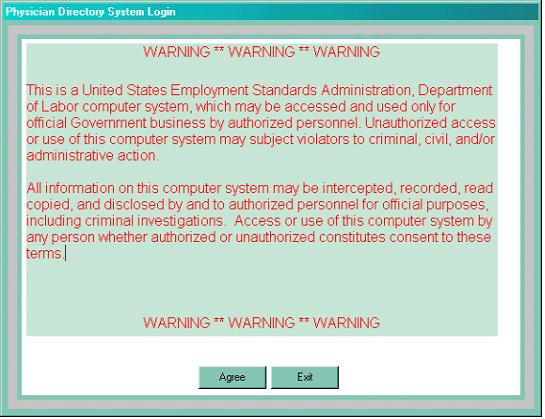
You will be greeted with the following login screen:
You must enter or click on "Agree" to continue. Then, you will have to log on, using the same login ID as with the previous version of PDS. Once you have logged on, you'll get the following screen:
To schedule an appointment:
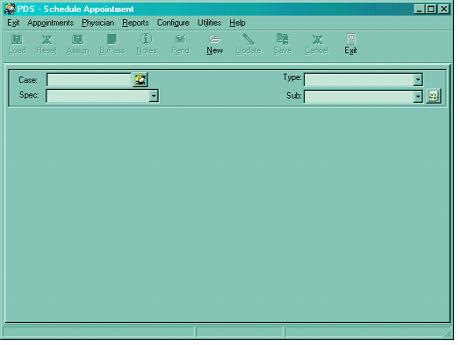
After logging in, the Cursor should already be positioned in the Case Number field. In the Case Number field type a case number. If you don't have the case number, you can choose to search using other criteria such as Claimant last name (more on this below). Then press the 'Tab' key (or click with the mouse) to move to the Appointment Type Field.
In the Appointment Type field select an appointment type by either pressing the 1st character of the available appointment types
I = IME
2 = Secop
A = Award
or by selecting the appointment type from the drop-down combo box. Then press the 'Tab' key (or click with the mouse) to move to the Specialty Field.
In the Specialty field select a specialty by entering the first letter of the specialty that you are looking for or use the mouse to view the drop-down list. Once this is done, click "Load" to select the next available doctor.
Once you have selected a doctor, you can assign the case to that doctor by either pressing the ALT + A keys simultaneously or clicking on "Assign." This will bring up the Schedule Doctor screen.
After you have set the appointment, you can document the appointment date on the Schedule Doctor screen by using the arrow keys on the keyboard or by clicking the arrows on that box. You can then tab to the appointment times box and set the time of the appointment the same way. You can then click "OK" to confirm scheduling. You will get confirmation that the appointment was scheduled for this doctor. You can then select "Print" and a record of the appointment will be printed for the file. Then, click the "Close" button to return to the main screen if you need to schedule another appointment.
Searching by claimant name:
Press this button to get the Select Case screen:
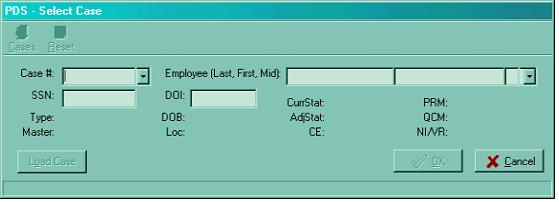
Enter the claimant's name into the last name field. A list of all cases with that last name will come up and you can scroll to find the correct one. When you locate it, you can select it by double-clicking it, or arrowing down to it and entering. Once the case selection record pops up, if the case selected is correct, click "OK" to schedule an appointment.
Bypassing a selected physician:
If the physician selected by PDS cannot be used, he or she should be bypassed, just as in previous versions of PDS. The reasons for bypass have not changed, and if there is question as to the validity of a bypass, FECA Bulletin 00-01 should be consulted.
After determining that a bypass is necessary and valid, press ALT + B keys simultaneously or click "Bypass." This will bring up the Bypass Doctor screen.
Find your reason for bypassing in the Select Bypass Reason box. If the bypass is any reason besides "Other," click "OK." If you have selected "Other," you must enter a note. Once you have clicked "OK," you will go back to the main form where the next available physician that meets the selection criteria will be displayed. You can then continue to schedule the appointment with the next available physician.
If you can't complete scheduling:
You can "pend" an appointment until you can finalize the scheduling by pressing "ALT + P" or clicking the "Pend" button. Click "OK" to confirm. If you later want to finalize this appointment, you can do so by selecting "Pending Appointments" on the "Appointments" menu.
Entering physician notes:
You can enter notes at any time during scheduling once you have selected the physician by either clicking "Notes" or by keying ALT + N. Once you have typed your note, either click "OK" or type ALT + O; this will confirm that your note has been saved and take you back to where you were.
Exiting the system:
You can exit PDS32 by either clicking on the "X" (as in other Windows programs) or clicking on "Exit" (the door symbol).
PDS: MANAGER'S MANUAL
Updating/Adding Physicians:
Under the "Physician" menu, you can either update a physician's record or add a new physician.
To update a physician's record:
Choose "Update Physician" from the "Physician" menu. This will bring up the following dialog box:
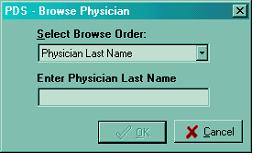
Then, to update a specific physician, enter that physician's last name (you can also browse by zip or specialty). You will get a listing of all physicians meeting that criteria. Select the physician you wish to update and either enter or double-click. This will bring up the Update Physician screen. You are then free to change any information on that physician's record.
To add a new physician:
Choose "Add Physician" from the "Physician" menu. This will bring up the following dialog box:
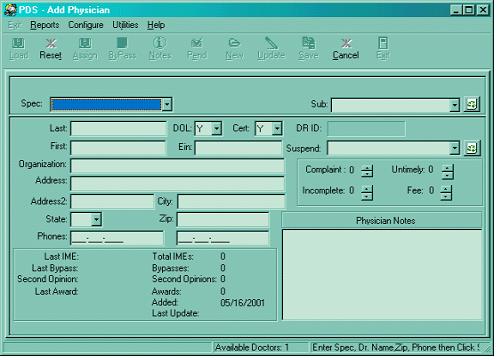
Once you have entered all information, either click on "Save" button or press the ALT + S keys simultaneously to save the information.
Updating/Adding Users:
Managers can add and update PDS users. Every PDS user MUST have an entry in this screen before logging in to PDS. Otherwise, PDS will not allow the user to log on. The User_ID must match the users Unix login ID.
To add a new user:
In the Utilities menu, click "Add/Edit Users." This will bring up a table of all users currently permitted PDS access. To add a new user, either select an empty row or create a new row in the grid by pressing the Insert key on the keyboard. Enter information in each field then use either the Arrow key or Tab key (or the mouse) to move to the next field. To save the new user information, select a different row in the grid and the user information will be automatically saved. Pressing the Esc key prior to moving to a different record cancels the New User record.
To Update an existing user:
In the table, select an existing user by using either the arrow keys or the mouse. Type over the existing information in the necessary field(s) then select a different record to automatically save the updated information. If a mistake is made while updating a user then the information can be changed again by typing over.
To Delete a User:
Select the user with either the mouse or the arrow keys. Press and hold CTRL + DELETE keys to display the Delete record confirmation dialog:
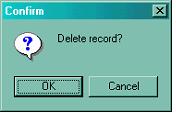
Click "OK" to remove the user from PDS.
Reports:
The reports available are the same as those in the prior PDS version. You can access any report by clicking on the "Reports" header and selecting from the pull-down menu. The types of reports are outlined below:
Appointment Log:
Selecting this option brings up the following screen:
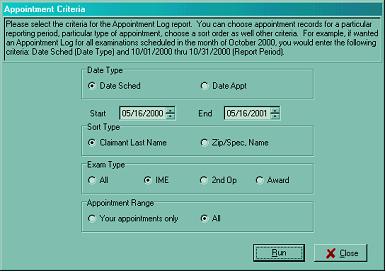
You can select the report criteria you want, then click "Run." You will then get a window showing a preview of the report that will print. You can then either cancel or run the report.
Physician History:
To get a history of all appointments scheduled for a specific physician, select this option. The following screen will come up:
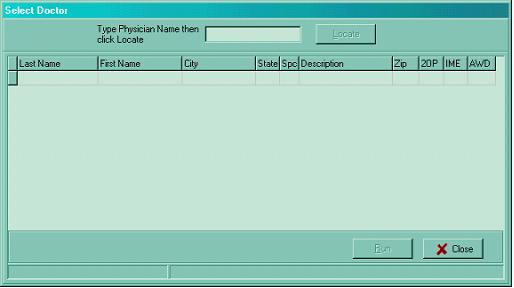
Enter the name of the physician whose history you want to view. Then, click "Locate." The physician's history will be displayed.
Physician Master:
This option allows you to get a list of all physicians within a zip code, and you may sort further by specialty. When you select this item, you get the following screen:
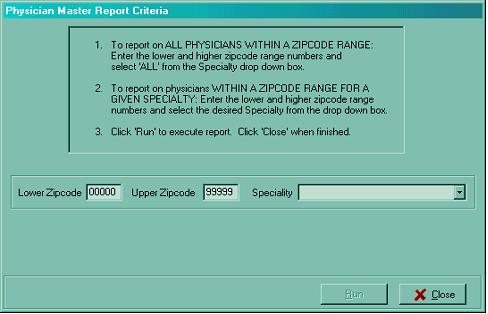
Once you enter the specifics for the report, you will get a print preview of the report, and you can either cancel or run the report.
Claimant History:
This allows you to obtain a record for all appointments scheduled through PDS for any claimant. Selecting this option brings up the following screen:
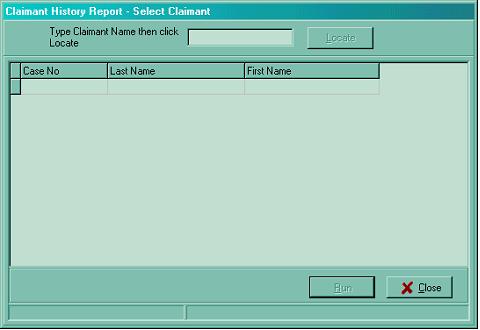
When you enter a last name, a listing of all claimants with that name who have had PDS appointments scheduled comes up. You can click on the desired claimant and then you will get a report to print out listing the details of all appointments scheduled.
Bypass Statistics:
This allows you to get a composite statistic of your office's use of bypass codes for any period. Selecting this item will bring up the following:
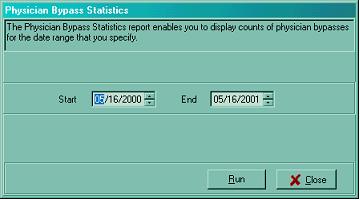
You can then specify the period for which you'd like to see bypass statistics and select "Run." When this is selected, you will get a preview of the report that will print and you can either cancel or run it.
Bypass History:
This will allow you to run a complete history of all appointments scheduled for a given period and list the bypasses logged in scheduling those appointments. Selecting this option gives you the following screen:
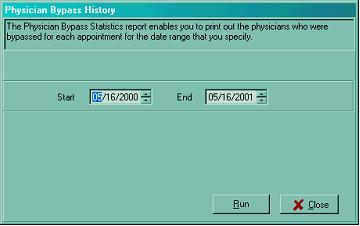
Once you enter the dates you wish to see and click "Run," you will again be given a print preview and be able to either run the report or cancel.
Physician Usage:
This allows you to display Physician Usage data based on the criteria you specify. You can select physician records by zip code/specialty/subspecialty with or without date range. You can further specify a threshold for number of exams/bypasses if desired.
When you select this, you get the following screen:
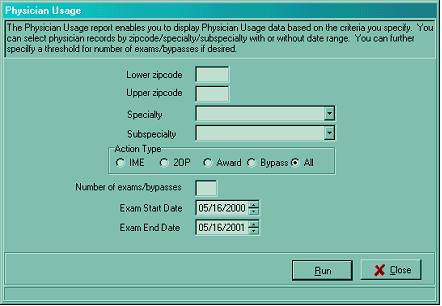
Once you enter the criteria for your usage search, you will get a print preview of the data, and you can either run it or just view it and cancel.
Back to Top of FECA Bulletin No. 01-11